[Android] Spalsh Screen
![[Android] Spalsh Screen](https://cdn.hashnode.com/res/hashnode/image/stock/unsplash/5RBXc7R-YWs/upload/3a81bd3e7f9faf3739f957901b0309ee.jpeg)
Android 12 이상에서 Cold, Warm Start시 새로운 Android의 기본 스플래시 화면이 강제로 적용된다. Android 11 이하 버전일 때 별도의 스플래시 화면을 만들어놨다면 Android 12 부터는 2개의 스플래시 화면이 보여진다.(Android 12 부터 적용되는 기본 스플래시 화면 + 따로 만든 Splash 화면)
Cold, Warm Start(+ Hot)과 새로운 Splash Screen 대응 방안에 대해 소개하겠다.
Cold, Warm, Hot Start
앱은 Cold Start, Warm Start, Hot Start 세 가지 상태 중 하나에서 시작한다.
Cold Start
앱이 처음부터 시작할 때 Cold Start라 한다. 기기가 부팅된 후 또는 앱이 종료된 이후, 앱을 처음 실행할 때 발생한다.
Warm Start
프로세스가 메모리 상에 아직 남아있는지가 cold start와의 중요한 차이점이다. 장시간 사용하지 않거나 메모리 부족으로 인해 프로세스를 안드로이드가 후 순위로 밀어낸 후에(그러나 아직 프로세스가 kill 되지 않은 순간) 다시 애플리케이션을 실행할 때 warm start로 인식된다.
Hot Start
안드로이드 시스템이 Activity를 포그라운드로 가져오기만 하면 된다. 앱의 모든 activity가 메모리에 살아있다면 객체 초기화, 레이아웃 확장, 렌더링을 반복하지 않아도 된다.
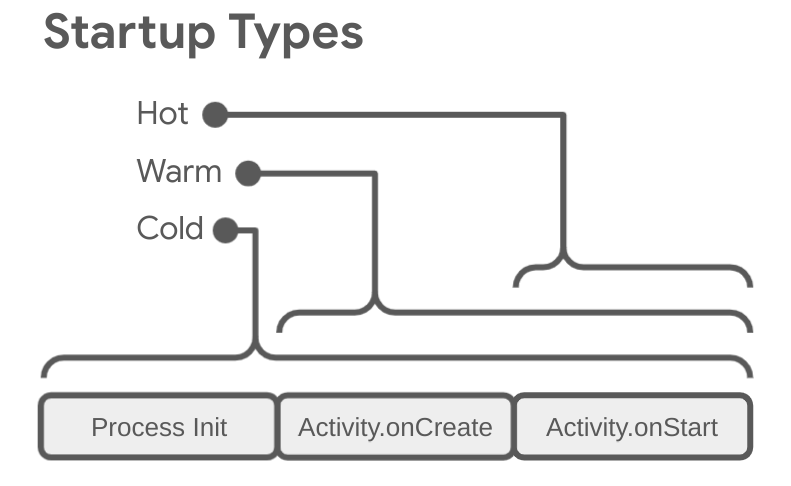
만약 Hot Start일때도 스플래시 화면을 보이게 만들었다면, 이는 불필요한 작업이다. 따라서 개발자가 Cold, Warm Start에만 스플래시 화면을 보이게 하도록 만들기 위해 안드로이드 12 이상에서 Splash Screen을 강제한 것으로 추측된다.
Migration Splash Screen
그러면 Android 11 이하에서 만들어놓은 스플래시 화면을 새로운 SplashScreen으로 어떻게 이전할까? -> SplashScreen Compat(중요) 라이브러리를 사용하면 된다. (Compat이 없는 SplashScreen Api는 Android 12이상에서만 동작한다.)
적용 방법
1.build.gradle 디펜던시 추가
dependencies {
   ...
   implementation 'androidx.core:core-splashscreen:1.0.1'
}
2.SplashScreen에 적용할 theme 추가
parent가 Theme.SplashScreen 인 theme를 추가한다. postSplashScreenTheme 에는 SplashScreen이 보여진 이후에 적용할 theme를 적는다.
<style name="Theme.App.Starting" parent="Theme.SplashScreen">
   // Set the splash screen background, animated icon, and animation duration.
   <item name="windowSplashScreenBackground">@color/...</item>

   // Use windowSplashScreenAnimatedIcon to add either a drawable or an
   // animated drawable. One of these is required.
   <item name="windowSplashScreenAnimatedIcon">@drawable/...</item>
   <item name="windowSplashScreenAnimationDuration">200</item>  # Required for
                                                                # animated icons

   // Set the theme of the Activity that directly follows your splash screen.
   <item name="postSplashScreenTheme">@style/Theme.App</item>  # Required.
</style>
3.매니페스트에서 activity또는 application의 theme를 이전 단계에서 만든 테마로 바꾼다.
<manifest>
   <application android:theme="@style/Theme.App.Starting">
    <!-- or -->
        <activity android:theme="@style/Theme.App.Starting">
...
4.Activity에서 setContentView 이전에 installSplashScreen 을 호출한다.
class SplashScreenSampleActivity : Activity() {

   override fun onCreate(savedInstanceState: Bundle?) {
       super.onCreate(savedInstanceState)

       // Handle the splash screen transition.
       val splashScreen = installSplashScreen()

       setContentView(R.layout.main_activity)
...
5.특정 작업이 끝난 이후까지 스플래시 스크린을 보여주게 하고 싶다면 다음과 같이 설정한다.
// Create a new event for the activity.
override fun onCreate(savedInstanceState: Bundle?) {
    super.onCreate(savedInstanceState)
    // Set the layout for the content view.
    setContentView(R.layout.main_activity)

    // Set up an OnPreDrawListener to the root view.
    val content: View = findViewById(android.R.id.content)
    content.viewTreeObserver.addOnPreDrawListener(
        object : ViewTreeObserver.OnPreDrawListener {
            override fun onPreDraw(): Boolean {
                // Check if the initial data is ready.
                return if (viewModel.isReady) {
                    // The content is ready; start drawing.
                    content.viewTreeObserver.removeOnPreDrawListener(this)
                    true
                } else {
                    // The content is not ready; suspend.
                    false
                }
            }
        }
    )
}
이제 안드로이드 12 이하에서도 새로운 스플래시 화면이 일관된 디자인으로 적용된다.
참고
https://no-dev-nk.tistory.com/54
https://developer.android.com/guide/topics/ui/splash-screen/migrate?hl=ko

![[Android] Compose 수명 주기, 부수효과](https://cdn.hashnode.com/res/hashnode/image/stock/unsplash/jpkfc5_d-DI/upload/afc85e4ef91c4d68e8e6b903c93f3f39.jpeg)
![[Android] rememberUpdatedState 완벽 이해](https://cdn.hashnode.com/res/hashnode/image/stock/unsplash/ktpymCAIvGc/upload/18f6ae11634822646df7c0a9b1e62e0f.jpeg)